> TrackPoint versus (Apple) trackpad is, fairly obviously, a matter of taste
I don't see how it is. It's a simple matter of efficiency. When using a trackpad, you have to move your hand off of the keyboard and down several inches. When using the TrackPoint, you do not - the TrackPoint is accessible with your index finger from the keyboard's home row. All 3 mouse buttons are accessible with your thumbs while your fingers rest on the home row.
When using a trackpad to scroll, you have to keep lifting your hand off the trackpad and moving it back to the other side of the trackpad to continue scrolling. With the TrackPoint, you just hold down the middle mouse button and push the TrackPoint in the direction you want to go, for as long as you want. How is this even comparable?
In fact, I have completely disabled the trackpad on my ThinkPad in the BIOS. I have no need for it when there's the TrackPoint.
Quick switching between keyboard and mouse is indeed a strength of the TrackPoint, and if you need to do that a lot, the TrackPoint might be superior. Some mitigating factors: one, imo Apple trackpads best shine when used for reading (web pages or PDFs), where it's not necessary to use the keyboard at all; two, unlike a mouse, the trackpad on my MBP is just a rotation of my right wrist away, which is certainly more than the rotation I would need to access a TrackPoint, but not unbearably disruptive. However, it's certainly true that when I'm on the keyboard, I try to stay on the keyboard (which is why I'm a vim user, heh).
For scrolling, Apple trackpads offer almost direct manipulation, which affords a sheer ease and precision that a mouse certainly cannot compete with; I'm skeptical that a TrackPoint can. Note also that you can do a quick scroll without having to actually press any buttons, just the wrist rotation and a flick; or if you're already moving the pointer, it's insanely easy to switch to a scroll. And there are other gestures: zooming, for instance, is certainly possible with other input methods, but doing it with direct manipulation on a trackpad again allows unmatched precision and doesn't require clicking any buttons. Or use three fingers to quickly flick between Spaces, if you're the kind of person that uses those; a keyboard shortcut would work, but the trackpad is very convenient.
(I never had a laptop with a TrackPoint, fwiw, so I can't personally compare both; keep in mind, though, that experience with a non-Apple trackpad is not really a good substitute for an Apple one either.)
> one, imo Apple trackpads best shine when used for reading (web pages or PDFs), where it's not necessary to use the keyboard at all
I don't think this is particularly true, especially for web browsing. For example, in responding to your comment, I just had to copy and paste your text to quote it. Because of the TrackPoint, I was able to easily copy and paste the text while keeping my hands in essentially one place.
If I were using a trackpad, I would have had to (a) move my hand onto the trackpad, (b) select the text, (c) move my hands back to the keyboard to hit Ctrl+c, (d) move my hands back to the trackpad to move the cursor to the input box and click in it, (e) move my hands back to the keyboard to hit Ctrl+v. That's back and forth twice. Just to copy and paste some text.
As a side note, text selection is something else I've found to be frustrating with trackpads, especially the new "clickpads" which don't have separate mouse buttons. It's hard to press down and move your finger at the same time. This isn't an issue at all with the TrackPoint, though.
> the trackpad on my MBP is just a rotation of my right wrist away
Perhaps it's because I'm not experienced with trackpads, but I have found that I really have to lift my hand up and move it down, using my arm muscles, to access any trackpad.
> For scrolling, Apple trackpads offer almost direct manipulation, which affords a sheer ease and precision that a mouse certainly cannot compete with; I'm skeptical that a TrackPoint can.
I just got a ThinkPad X1 Carbon a few days back, an ultrabook which reviews have said has a trackpad comparable to that on the MacBooks. Out of curiosity, I thought I'd try using it, but I found it to be no less precise than a TrackPoint and much more tedious to use.
I think part of the issue is that the TrackPoint has a learning curve that the trackpads do not. Most people give up on the TrackPoint before they ever learn how to use it properly. For whatever reason, when I got my first ThinkPad, I started using the TrackPoint extensively, and after a few weeks, I had the hang of it. Since you're also a Vim user, perhaps you can understand it as similar to the difference between using a plain-old text editor and Vim, in terms of the learning curve and eventual advantages.
> And there are other gestures: zooming, for instance, is certainly possible with other input methods, but doing it with direct manipulation on a trackpad again allows unmatched precision and doesn't require clicking any buttons. Or use three fingers to quickly flick between Spaces, if you're the kind of person that uses those; a keyboard shortcut would work, but the trackpad is very convenient.
I don't have much experience with zooming - it really hasn't ever been necessary on a computer for me to use it on a regular basis, so I can't comment on that.
As for window management, I've traditionally used XMonad, so keyboard shortcuts are how I get things done with respect to window management. However, I have XFCE installed instead on my new laptop, so I'll see how that goes. Of course, OS X and Windows are much less customizable than Linux, so custom shortcuts may not be an option there.
> If I were using a trackpad, I would have had to (a) move my hand onto the trackpad, (b) select the text, (c) move my hands back to the keyboard to hit Ctrl+c, (d) move my hands back to the trackpad to move the cursor to the input box and click in it, (e) move my hands back to the keyboard to hit Ctrl+v. That's back and forth twice. Just to copy and paste some text.
Well, trackpad only requires one hand, the other one can stay on the left side of the keyboard for those keyboard shortcuts. Certainly can sitll be annoying if you have to actually type something, such as in the address bar.
> As a side note, text selection is something else I've found to be frustrating with trackpads, especially the new "clickpads" which don't have separate mouse buttons. It's hard to press down and move your finger at the same time. This isn't an issue at all with the TrackPoint, though.
Indeed, which is why I emulate the old style and click with my thumb while dragging with a finger - this works fine.
> Perhaps it's because I'm not experienced with trackpads, but I have found that I really have to lift my hand up and move it down, using my arm muscles, to access any trackpad.
It helps that I have big hands.
> Since you're also a Vim user, perhaps you can understand it as similar to the difference between using a plain-old text editor and Vim, in terms of the learning curve and eventual advantages.
I wouldn't be surprised - but I'm not convinced that the result is actually better than a trackpad.
> I don't have much experience with zooming - it really hasn't ever been necessary on a computer for me to use it on a regular basis, so I can't comment on that.
It makes fitting, say, the window with the portion of a PDF document you want to read relatively easy (although PDFs don't scroll and zoom nearly as smoothly as web pages in Safari; ugh).
> As for window management, I've traditionally used XMonad, so keyboard shortcuts are how I get things done with respect to window management.
Me too, actually - I use SizeUp, which lets me move windows to predefined regions of the screen with keyboard shortcuts, and since I also use Cmd-Tab extensively, a keyboard shortcut is superior for me here - but I know many people love their Spaces.
> When using a trackpad, you have to move your hand off of the keyboard and down several inches.
~2 is not "several" in modern english usage.
More to the point: personally, I use my thumb on the trackpad, so by your standards of evidence the track point is less efficient than the trackpad; my fingers never leave their home row positions, whereas yours do to use the track point. In reality, yes, it's personal preference.
On my X1 Carbon[0] it's 4" from the home row to the middle of the trackpad. Subtracting 0.5" for the separate mouse buttons, that would be 3.5" to the middle of the trackpad.
> personally, I use my thumb on the trackpad
Can you "two-finger scroll" with your thumb on the trackpad? And from what another post said, you have to rotate your wrist to do this anyway.
> so by your standards of evidence the track point is less efficient than the trackpad; my fingers never leave their home row positions, whereas yours do to use the track point.
What are you talking about? My fingers never leave the home row to use the TrackPoint. You do realize that the TrackPoint is located between the "G", "H", and "B" keys, right?
To "two finger" it all you have to do is rotate your hand slightly and swipe with finger and thumb. This gesture becomes effortless once you internalize it.
The problem with the "stick" is that, like a game-pad controller, it operates like a steering wheel. It doesn't move the mouse directly, but it changes the rate at which the mouse is moving. This is a degree removed from actually steering the mouse and it's why it frustrates a lot of people.
If you're a "home row" person that's fine, we all have our preferences, but you're probably in the minority and the appeal of that feature is more limited than a responsive track-pad.
"the TrackPoint is accessible with your index finger from the keyboard's home row"
This really, is the end of the discussion for me. After using the trackpoint for years and becoming spoiled by being able to maintain proper posture at all times, not having a trackpoint on all of my other keyboards has lead me to slowly abandon mouse use wherever possible. For me, it is a choice between either a trackpoint or nothing at all. If I had a MBP, I would disable the trackpad entirely; it would only get in my way.


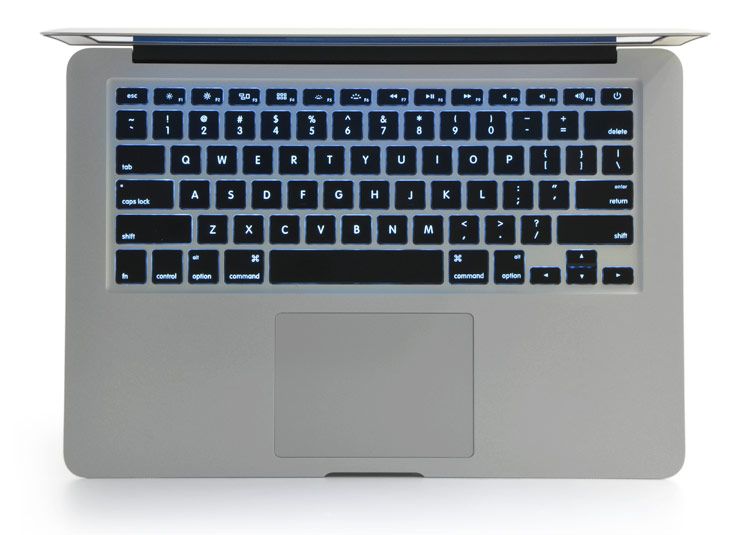

I don't see how it is. It's a simple matter of efficiency. When using a trackpad, you have to move your hand off of the keyboard and down several inches. When using the TrackPoint, you do not - the TrackPoint is accessible with your index finger from the keyboard's home row. All 3 mouse buttons are accessible with your thumbs while your fingers rest on the home row.
When using a trackpad to scroll, you have to keep lifting your hand off the trackpad and moving it back to the other side of the trackpad to continue scrolling. With the TrackPoint, you just hold down the middle mouse button and push the TrackPoint in the direction you want to go, for as long as you want. How is this even comparable?
In fact, I have completely disabled the trackpad on my ThinkPad in the BIOS. I have no need for it when there's the TrackPoint.